
This guide gives you every method to check your EPF claim status accurately, explains what each status actually means for your timeline, and tells you the exact steps to take if your claim is stuck or rejected.
Whether you filed Form 31 for a partial withdrawal, Form 19 after leaving a job, or Form 10C for your pension component, the tracking and resolution process works the same way. This guide covers all of it, from logging into the UAN portal to filing a grievance on EPFiGMS.
This process works both online through the UAN member portal and UMANG app, and offline through SMS and missed call services.
Also Read : How to Fill Form 121 for EPF Withdrawal
Table of Contents
Real Member Scenario
Rajan submitted his Form 31 claim for Rs 15 lakh. Ten days later….
Rajan worked at the same company for seven years and applied for a partial withdrawal for house construction on November 26th. By December 4th, his UAN portal showed no status update. By December 6th, it changed to “claim under process and will be settled shortly.” He received the funds in his bank account on December 19th.
What Rajan did not know was that his claim had passed through the employer verification stage, moved to the field office queue, and spent four days in the batch processing window before the settlement message triggered. Had his Aadhaar or bank account name been slightly different, the claim would have returned to him without any specific reason stated on the portal.
The “settled shortly” SMS after a Form 31 claim typically means the money arrives within 8 to 14 days. The portal does not show this stage clearly.
How to Check EPF Claim Status Online Using the UAN Member Portal Step by Step
The UAN Member Portal at unifiedportal-mem.epfindia.gov.in is the most direct method. It shows the current processing stage for all claim types in real time. Log in using your UAN and password, then navigate to the Online Services menu at the top of the screen. Inside that menu, you will see a “Track Claim Status” option. This page does not require any additional form input. It displays your latest submitted claim along with its current stage, the claim reference number, and the date of the last status change.
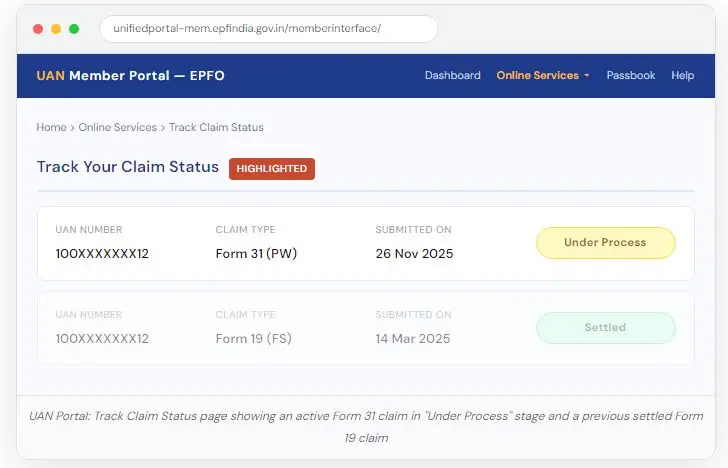
The portal shows only the current claim and the last two to three processed claims. If you submitted your claim within the last 72 hours and no status appears, it means the employer has not yet approved it from their end. The clock on EPFO processing does not start until the employer digitally approves the claim in their own login.
Important Note : If your UAN portal shows no claim at all after 48 hours of submission, log in to the employer portal status or contact your HR. The claim may be sitting in the employer verification queue, not with EPFO yet.
Step by Step EPF Claim Status Tracking on UMANG App in 2026
The UMANG app (Unified Mobile Application for New-age Governance) is available on both Android and iOS. For members who find the web portal slow or inconvenient on mobile, UMANG gives the same tracking functionality through a simpler interface. After logging in with your mobile number linked to your UAN, go to the EPFO section. Under Employee Centric Services, tap on Track Claim. The app displays non-financial claim details including the current stage and the date of last update.
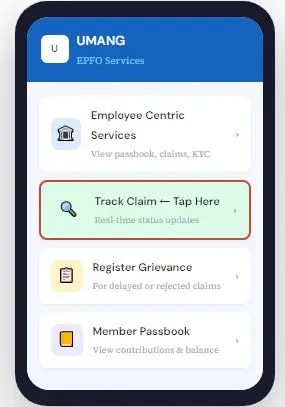
One limitation of UMANG worth knowing: the app does not display the reason for rejection. If your claim is rejected, the app will show the status but not the cause. You will need to log into the full UAN portal or call the helpline to get the rejection reason. This is a common point of confusion for members who rely entirely on the app.
How to Check EPF Claim Status Offline Using SMS, Missed Call and EPFO Helpline
EPFO provides three offline channels that work from any basic mobile phone as long as your number is registered on the UAN portal. All three methods pull from the same database as the online portal, so the status you receive is accurate and up to date.
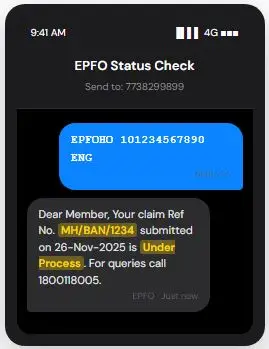
SMS method: Send your UAN to 7738299899 and receive claim status on your registered mobile
SMS Service FREE
7738299899
Type and send to this number:EPFOHO <UAN> ENG
Replace ENG with HIN for Hindi, MAR for Marathi, or the first three letters of your preferred language. Works from any mobile on standard SMS rates.
Missed Call Service FREE
9966044425
Give a missed call from your registered mobile. No charge. Call drops automatically.
You will receive an SMS within 30 seconds showing your latest contribution details and any active claim status. Works only from your UAN-linked mobile number.
EPFO Toll-Free HelplineTOLL-FREE: 1800 118 005
Mon to Sat | 9:15 AM to 5:45 PM, Government holidays excluded. Calls are answered in Hindi and English.
Have These Ready Before Calling
- Your 12-digit UAN number
- Claim reference number from the portal or your submission SMS
- Registered mobile number (the agent verifies identity through it)
he helpline is the only offline method that can give you a rejection reason. The SMS and missed call services confirm status and contribution details but cannot explain why a claim was rejected or what specific correction is needed. If your claim shows Rejected on the portal and you are not sure why, calling 1800118005 with your claim reference number is the fastest way to get the exact reason code before refiling.
What Does EPF Claim Under Process Status Mean and How Long Will It Take
The phrase “Under Process” is one of the most common points of confusion in EPF claim tracking. It does not mean your claim is stuck. It means the claim is currently sitting at one of the three active processing stages inside the EPFO system. Understanding which stage it is at helps you estimate the realistic timeline.
Under Process
Claim is in the EPFO field office queue. Standard wait is 7 to 20 working days depending on claim type and office load.
Settled
EPFO has approved and dispatched funds. Money reaches your bank in 3 to 5 business days from this date.
Rejected
Claim denied. A specific reason code is assigned. Refile after correcting the identified issue.
Returned
Usually a bank account or KYC mismatch. Update details on the UAN portal and refile within 10 days.
When a member receives an SMS saying the claim “will be settled shortly,” this is not the same as the Settled status. It means the claim has passed the verification stage and entered the payment queue. From this SMS to the credit in your bank, the typical window is eight to fourteen days for Form 31 and three to seven days for illness claims, which are given priority in the processing queue.
How to Check PF Withdrawal Status Without UAN on the EPFO Website
If your UAN is not activated or you do not have your UAN credentials handy, the EPFO website still allows status tracking through your PF account number. Your PF account number is printed on your salary slip or appointment letter. It follows the format: Regional Office Code, Establishment Code, and Member ID. For example, MH/BAN/0012345/000/0000001.
Go to the EPFO website at epfindia.gov.in, navigate to the Services section for employees, and look for the claim status option that does not require UAN login. Enter your PF account number and the personal details requested for verification. This method gives you the same status information as the portal login method, but it is slower because the system has to resolve your account manually rather than pulling it directly from a UAN session.
Why EPF Claim Gets Rejected After Submission and How to Fix Each Reason
A rejected claim is not a permanent denial. In most cases it means a specific document or detail failed the EPFO’s automated verification. The fix depends entirely on the reason code assigned to your rejection. Here are the specific causes that account for most rejections in 2026, along with what each one requires from you.
| Rejection Cause | Impact | Resolution |
|---|---|---|
| Name mismatch between Aadhaar and bank account | Claim returned immediately | Update name in bank records or request EPFO joint declaration form with employer |
| EPS contribution mismatch from previous employer | Full settlement blocked | Submit joint declaration form to correct overlapping service records |
| Service less than 5 years with active TDS trigger | Partial deduction or rejection | Submit Form 15G or PAN details for TDS exemption consideration before refiling |
| Wrong form type selected for claim purpose | Automatic rejection | Refile with correct form: Form 19 for final settlement, Form 31 for partial withdrawal |
| Dual employment records flagged in the system | Claim held for manual review | Contact field office with both employer certificates to clarify employment dates |
The KYC and bank mismatch issue is the single most common rejection cause in 2026. Many members update their bank account number on the UAN portal but do not check whether the account name in the bank records exactly matches their EPFO name. Even a middle name difference, a spelling variation, or an abbreviated name can trigger a mismatch in the automated verification system.
Multiple EPF accounts? transfer to one UAN Online and offline
Pro Tip from Experienced Members Before filing any large withdrawal, submit a small illness claim of Rs 1,000 first. If that settles without issues, your bank account and KYC are clean. If it returns or rejects, you have identified the problem before your main claim gets delayed.
EPF Claim Stuck Under Process for More Than 20 Days What to Do Next
If your claim has not moved beyond “Under Process” for more than 20 working days, the EPFO’s own service guidelines treat this as an overdue case. At this point, passive waiting is not the right approach. There is a defined escalation path that members rarely use because most do not know it exists.
Verify the Claim Is Actually in EPFO’s Hands
Log into your UAN portal and confirm that the employer has approved the claim. If it shows “Pending with Employer,” the 20-day clock has not started yet.
Check Your Registered Mobile for Status SMS
EPFO sends SMS alerts at key stages. If you missed an SMS about a returned or rejected status, the portal may still show “Under Process” on certain views.
Call the EPFO Helpline at 1800118005
This is toll-free. Quote your UAN and claim reference number. The agent can see the detailed internal status and tell you exactly where the claim is sitting and why.
File a Grievance on EPFiGMS
Go to epfigms.gov.in and file a formal complaint. This creates a ticket that the field office is required to respond to within 15 days. Include your UAN, PF account number, claim type, and the date of submission.
How to File EPF Grievance Online When Your Claim Is Delayed or Rejected
The EPFiGMS portal (EPFO Grievance Management System) at epfigms.gov.in is the official channel for complaints about delayed or rejected claims. It is free to use and does not require you to visit the field office. Filing here creates a formal record that field officers must respond to within the EPFO’s published service level targets.
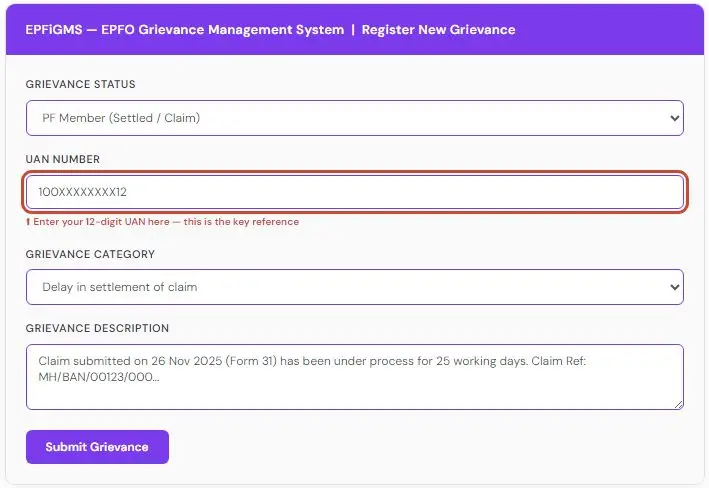
When filling the grievance form, select “PF Member (Settled / Claim)” as the status category and choose the appropriate grievance type, either “Delay in settlement” or “Wrong rejection.” Write a factual description: state the form type, the submission date, the claim reference number, and the number of working days elapsed. Avoid vague language. The more specific your description, the faster the field office can locate and act on your file.
After EPF Claim Shows Settled: The Full Journey to Your Bank Account
The “Settled” status on the UAN portal does not mean the money is in your bank. It means EPFO has processed the payment on their side and sent the transfer instruction to the National Payments Corporation of India (NPCI) or directly to the bank. The actual credit to your account depends on the bank’s processing time for inward NEFT transfers.
- Day 0: Status Changes to Settled on UAN Portal
- EPFO has approved the claim and generated the payment instruction. A debit entry appears in your EPF member passbook around the same day.
- Day 1 to 2: Payment Enters NEFT / PFMS Queue
- The transfer moves through the Public Financial Management System (PFMS) and enters the NEFT clearing cycle. No portal reflects this intermediate stage.
- Day 3 to 5: Credit in Your Bank Account
- For most nationalised banks, the credit appears within this window. For private banks with different NEFT processing times, it may extend to Day 5 or 6.
- Day 7+: No Credit: Contact Bank First, Then EPFO
If seven business days have passed after Settled status and no credit has appeared, first check with your bank whether the transfer was received but failed validation. If the bank shows no incoming transfer, contact EPFO with the settlement reference number from your passbook.
If the Amount Credited Is Less Than Expected : Check whether your total service is under five years. For service periods below five years, EPFO deducts TDS at 10% if PAN is seeded, and at 30% if PAN is not linked. Illness claims have specific withdrawal caps regardless of your total balance. These are not errors. They are statutory deductions applied at settlement.
Apply for PAN card online for free to avoid 30% tds deduction
Frequently Asked Questions(FAQ)
My employer approved the claim but the portal still shows it as pending with EPFO. Is this normal after Day 5?
es, EPFO field offices batch-process claims and there is typically a 3 to 7 working day gap between employer approval and the EPFO system reflecting “Under Process.” If this extends beyond 10 working days post-employer approval, call 1800118005 with your claim reference number to check whether the claim was received by the field office.
I transferred old accounts into my current UAN but the total service is still showing incorrectly. Will this cause a rejection?
Yes, this is a known issue. After a transfer, the system may take 15 to 30 days to update the service history in your EPF record. If you apply for a full settlement before this updates, the claim may get rejected for insufficient service. Verify the updated service period in your member passbook under “Service Details” before submitting any claim that depends on total service years.
Can I refile a rejected claim immediately or do I have to wait?
You can refile after correcting the rejection reason. There is no mandatory waiting period for resubmission after a rejection, unlike after a withdrawal. However, the same rejection will repeat if you refile without actually fixing the underlying issue. Confirm the reason code first from the UAN portal or by calling the helpline.
The SMS said the claim was accepted and would be settled shortly, but it has been three weeks and no money has arrived. What does this mean?
This typically points to a payment failure rather than a processing failure. The “settled shortly” SMS confirms EPFO’s side is done. The breakdown is most likely in the bank account validation stage. Check whether your bank account number on the UAN portal is correct to the last digit, and whether the account is active and not frozen. Contact your bank first before escalating to EPFO.
My passbook shows a debit entry but the bank has not received the funds. Who do I contact first?
The passbook debit means EPFO has released the funds from their side. Start with your bank. Ask for a statement of inward NEFT credits for the relevant dates. If the bank confirms no incoming transfer was received, file a grievance on EPFiGMS with the passbook debit reference number. EPFO can then trace the payment through the PFMS system and investigate at the bank end.
Quick Recap for your referance
| Standard processing time | 7 to 20 working days |
| Illness claims | Fastest (priority queue) |
| Bank credit after EPF process | Settled 3 to 5 business days |
| Escalation threshold | 20+ working days |
| TDS if service under 5 yrs (with PAN) | 10% deducted |
| Grievance response | 15 days |
Forms to download related to EPF
Form 11: Employee Self Declaration form | PDF
Form 13: Transfer Your EPF To One UAN | PDF
Form 121: Replacement for Form 15G & 15H | PDF ( New official self-declaration form introduced under Section 393(6) of the Income-tax Act, 2025, prevent Tax Deducted at Source (TDS) on incomes )